A Validation Checklist for Four-Camera Edge Computing Platforms
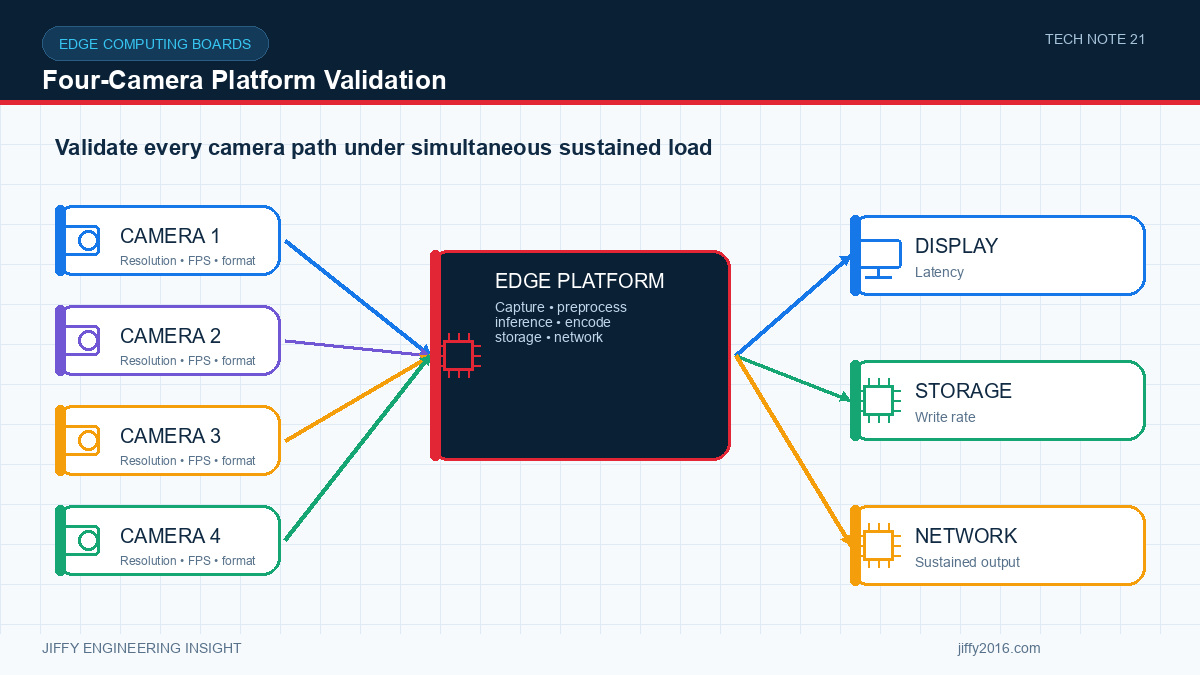
Quick answer: To validate a four-camera edge computing platform, test synchronized capture, memory bandwidth, image processing, encoding, AI inference, storage, networking, power and thermals as one continuous workload. Record camera, board, operating-system, driver, firmware and model versions, and repeat fault-recovery tests after cold start, reconnect and long-duration operation.
Connecting four cameras is not the same as sustaining four reliable image pipelines. A production edge system must coordinate sensor timing, bandwidth, image processing, encoding, AI inference, storage, networking, power and heat without losing the behavior the application depends on.
- Key Takeaways
- Freeze each camera interface and timing configuration before testing.
- Define and measure the required synchronization tolerance.
- Run capture, processing, encoding, inference and storage together.
- Test network, storage, camera and power failures deliberately.
- Approve the platform under the final enclosure and thermal conditions.
- Freeze the camera configuration
- Define synchronization
- Account for the full data path
- Validate image quality and controls
- Test AI inference under system load
- Exercise codecs, storage and network output
- Measure power and temperature
- Production-Readiness Checklist
- All four cameras detected consistently
- Required synchronization demonstrated under defined conditions
- No unexplained dropped frames at the production workload
- Stable image settings and camera assignment after restart
- Target inference and video performance achieved together
- Storage and network failures handled predictably
- Power interruptions do not corrupt the required configuration
- Thermal behavior is stable in the final enclosure
- Hardware, operating-system, driver, firmware and model versions recorded
- A repeatable production test verifies essential interfaces
- FAQ
- Why is a four-camera demonstration not enough for production approval?
- How should camera synchronization be verified?
- What versions should be recorded in the test report?
- Conclusion
Record the sensor model, resolution, pixel format, frame rate, lane configuration, clocking, exposure mode and cable length for every camera. If the cameras are different, map each one to its interface and processing path.
Confirm start-up order and detection behavior. The system should identify a missing or misconfigured camera without silently shifting device assignments.
Applications such as surround view, measurement and multi-angle inspection may need frames captured at nearly the same time. Define the allowed timing difference and how it will be measured. A shared trigger, common clock or software timestamp can provide different levels of synchronization.
Validate synchronization after cold start, restart, cable reconnection and long continuous operation. Do not rely only on timestamps if the clock source and buffering path are not understood.
Calculate raw input bandwidth and the load created by image signal processing, scaling, format conversion, encoding, AI inference, display and storage. Memory bandwidth and copy operations can become limiting even when individual processors are not fully occupied.
Run the complete pipeline, not isolated benchmarks. Use scenes with realistic motion and detail, because encoder and inference workloads can vary with content.
Check exposure, gain, white balance, noise reduction, sharpening, color consistency and lens correction under representative lighting. If several cameras observe the same object, inconsistent controls may reduce the usefulness of combined images.
Confirm how settings are initialized, stored and restored. Document whether controls are per camera or shared.
Measure the complete application rate and latency, including image preparation, inference and post-processing. A headline accelerator performance figure does not equal application throughput.
Run all required models together with video encoding, networking and storage. Monitor memory use, queue depth and dropped frames. Define which function has priority if the system becomes overloaded.
Test every required stream format, bitrate and resolution. Confirm timestamps and file integrity over long recording periods. Simulate a full disk, disconnected network, slow receiver and interrupted power.
If the system streams several cameras, measure sustained application throughput and packet loss at the final interface. Include protocol overhead and traffic from control, telemetry and updates.
Record input voltage, average and peak current, processor temperature, board temperature and any throttling indicators during the worst expected workload. Repeat at the target ambient temperature and in the final enclosure orientation.
A system that passes a short bench demonstration may throttle or lose stability after heat accumulates. Long-duration testing should include repeated start, stop, reconnect and inference cycles.
A short demonstration may not expose memory contention, frame loss, thermal throttling, storage faults or restart problems. Production validation must run the complete sustained workload.
Define the allowable time difference, use a measurable visual or electrical event and verify the timing after cold start, restart, reconnection and long-duration operation.
Record the board and camera revisions, operating system, drivers, firmware, AI runtime, model, application, configuration and test assets.
A multi-camera edge platform should be approved as a complete workload, not as separate camera, codec and AI demonstrations. Jiffy can help define an evaluation configuration for the JAIDB-3576-4C platform and build a repeatable validation plan around the intended cameras and application.
Discuss your system requirements with Jiffy
market@jiffy2016.com | www.jiffy2016.com
Subscribe to Our Newsletter
Your Email*
*Country*
*Verification code